Customer survey tools for Salesforce: Top platforms & features
Most CSAT survey software collects feedback and provides insights, but you need a solution that’s deeply integrated with Salesforce to drive action. The difference comes down to whether feedback stays locked in dashboards or directly integrates into the workflows your teams already live in.
When survey data lives inside your CRM, you can turn insight into action. Reps can close the loop faster, customer issues get addressed sooner, and businesses reduce churn risk while improving retention.
This guide reviews customer survey tools that integrate with Salesforce. We’ll compare features, pricing, use cases, and strengths, so you can see how each platform helps teams collect feedback across multiple channels, automate surveys based on Salesforce events, and turn raw responses into actionable insights that improve customer experience and drive growth.
Here are the tools we’ll cover:
AskNicely
SurveyMonkey for Salesforce
Formstack
Simplesat
GetFeedback
Alchemer
Before diving in, let’s level-set on a few basics.
What are customer survey tools for Salesforce?
Customer survey tools for Salesforce are integrated feedback management solutions that automatically collect, analyze, and action customer insights directly within your Salesforce CRM ecosystem. These platforms seamlessly integrate survey functionality, ranging from NPS and CSAT measurements to custom feedback surveys, into existing Salesforce workflows, enabling real-time tracking of customer sentiment across all touchpoints.
By synchronizing survey data with Salesforce records and objects, these tools transform raw feedback into actionable insights that trigger automated workflows, populate dashboards, and update customer data without manual intervention. These tools provide a unified view where customer satisfaction metrics, survey responses, and CRM data converge to drive smarter decision-making and more responsive customer support.
Why invest in customer survey tools for Salesforce?
Ultimately, service brands that connect feedback directly to their frontline teams see significant improvements in customer satisfaction. On the other hand, those treating surveys as reporting exercises struggle to move the needle.
Accelerated revenue protection and growth:Real-time survey responses automatically trigger follow-up workflows for at-risk accounts, while NPS data identifies expansion opportunities within your Salesforce pipeline, turning customer sentiment into immediate revenue action.
Operational efficiency at scale: Automation eliminates manual data collection and entry, while streamlined survey creation and template libraries reduce setup time, freeing your support team to focus on high-value customer interactions rather than administrative tasks.
Strategic customer intelligence advantage: Unified dashboards combining survey results with Salesforce data reveal patterns invisible in siloed systems, enabling predictive customer experience strategies that may anticipate issues before they impact retention.
Frontline empowerment through integrated insights: Some survey tools push actionable insights directly to customer-facing teams via Slack, SMS, and embedded Salesforce interfaces, transforming every customer interaction into an opportunity for immediate service recovery and relationship strengthening.
How to choose customer survey tools for Salesforce
When considering a customer survey tool for Salesforce, look for features that turn feedback into action. Focus on capabilities that empower your teams and drive real behavioral change:
Frontline accessibility and personal scorecards: Look for solutions that provide individual team members with direct access to their performance metrics and customer feedback within Salesforce records. This empowers employees to take ownership of customer satisfaction in service delivery.
Real-time feedback distribution and workflows: Evaluate whether the platform can instantly route survey responses to the right people and trigger automated follow-up actions in your CRM. Speed of response directly impacts customer engagement and retention rates.
AI-powered theme analysis and coaching: Beyond basic NPS or CSAT scores, assess the depth of sentiment analysis and whether the system identifies emerging issues, provides personalized coaching recommendations, and surfaces actionable insights from unstructured customer data.
Multi-channel survey deployment with dynamic logic: Consider platforms that adapt survey questions based on past performance and customer interactions across SMS, email, and embedded touchpoints. This intelligence drives higher response rates and more relevant data collection from respondents.
Native Salesforce integration beyond basic sync: Examine whether the survey tool truly embeds into Salesforce workflows, updating custom objects and Salesforce data in real-time, versus requiring manual transfers or limited AppExchange connections that create silos.
Recognition and gamification features: If important, assess whether the platform includes recognition and gamification features for celebrating wins, creating leaderboards, and automatically surfacing praise from customer surveys. These features streamline engagement and reinforce positive behaviors across distributed teams through notifications and lifecycle automation.
Top customer survey tools for Salesforce
When your customer data lives in Salesforce, your survey tool should do more than collect responses. It should connect directly with CRM workflows, surface insights where your teams already work, and integrate feedback into the daily rhythm of your business. The right tool helps you capture sentiment at every touchpoint, turn it into clear actions, and build loyalty over time.
Here’s a breakdown of some of the top customer satisfaction tools for Salesforce, their features, use cases, and pricing.
AskNicely
Features
Two-way SF sync, AI surveys, multi-channel feedback, text analysis, leaderboards, coaching
Use cases
Frontline CX, triggered surveys, coaching
Pricing
$449–$999/mo; volume pricing; CSM >$9,600/yr
Target market
B2C, multi-location services with frontline teams
Pros
Deep SF integration; high response rates; real-time visibility
Cons
No free trial; annual contracts; overage fees
Parameter
AskNicely
SurveyMonkey
Formstack
Simplesat
GetFeedback
Alchemer
Features
Two-way SF sync, AI surveys, multi-channel feedback, text analysis, leaderboards, coaching
SF package, event triggers, object sync, AI insights, SF dashboards
No-code forms, eSignature, workflow automation, native SF data capture
Multi-channel surveys, AI tools, routing, SF automation, VoC tooling
Advanced logic, in-app surveys, AI analysis, 400+ integrations
Use cases
Frontline CX, triggered surveys, coaching
Journey feedback, case surveys, CRM insights
Digital workflows, document generation, regulated processes
Ticket CSAT, agent scoring, helpdesk integration
VoC programs, CX measurement, product feedback
Complex surveys, integration-heavy needs, research
Pricing
$449–$999/mo; volume pricing; CSM >$9,600/yr
Free basic; $39/mo–Enterprise
$83–$250/mo+; Enterprise custom
$119–$499/mo; Enterprise quote
Quote-based
$55–$275/user/mo; custom options
Target market
B2C, multi-location services with frontline teams
Mid-large SF orgs needing embedded feedback
Mid-market/enterprise in regulated industries
Service orgs using SF/helpdesks
Mid-enterprise SF users needing VoC
Teams requiring advanced logic and compliance
Pros
Deep SF integration; high response rates; real-time visibility
SF embedding; flexible automations; AI insights
No-code building; native SF; document workflows
Fast setup; responsive support; strong automation
Easy creation; robust analytics; broad channels
Powerful logic; strong integrations; reliable
Cons
No free trial; annual contracts; overage fees
Complex setup; enterprise plan often needed
Advanced features cost more; mixed support
Limited analytics; integration-dependent
Limited design options; learning curve
Complex for new users; scaling costs
What is AskNicely?
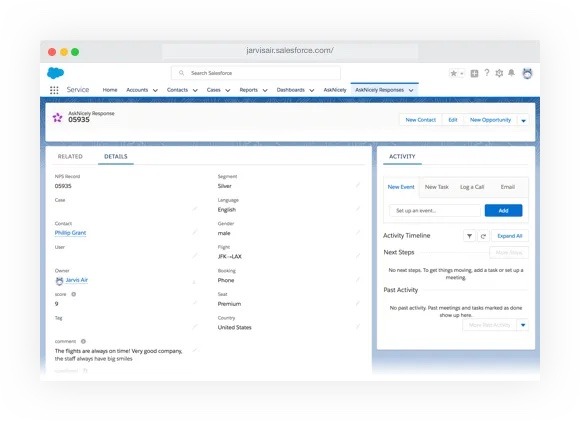
AskNicely is an AI-enabled customer experience platform that helps service businesses collect and act on customer feedback through NPS, CSAT, and 5-star surveys. While other platforms focus on dashboards for the head office, AskNicely is built for the frontline, featuring native Salesforce integration that enables two-way data synchronization, allowing businesses to trigger surveys based on Salesforce events and store feedback directly against customer records.
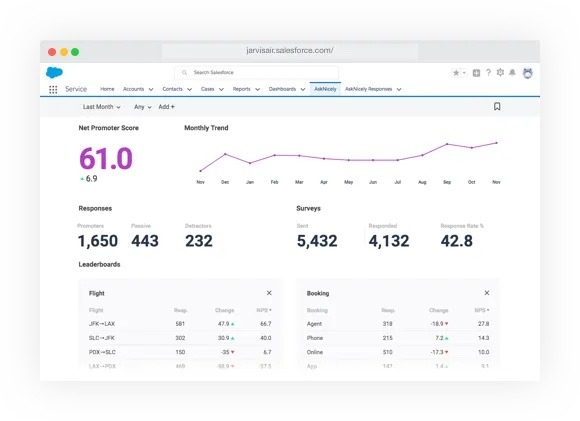
Fully automate and track all things NPS in Salesforce
Automatically trigger surveys based on any event or schedule within your Salesforce dashboard. Track and filter automated net promoter score activity by segment, region, account — virtually anything you want.
Gamify customer feedback with leaderboards
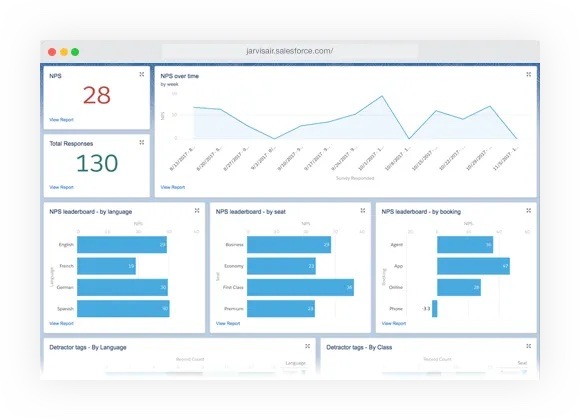
Rank your best segments, channels, products, and agents to instantly see which business areas are creating promoters and which are creating detractors.
Use deeper insights to craft fluid responses
Build custom reports and dashboards based on real-time NPS data that you can use to reduce churn, retain customers, and fuel true business growth. Use your existing Salesforce workflows to follow up on customer feedback individually or at scale.
AskNicely - Key products and features
Salesforce integration: Two-way integration that triggers surveys based on Salesforce events or report data and stores feedback against contacts. Users access AskNicely directly from their Salesforce screen for seamless workflow integration.
NiceAI:NiceAI makes feedback smarter by asking dynamic, real-time questions tailored to each customer’s data and history. It condenses responses into clear, actionable insights, highlights key trends, and even reframes negative comments into constructive feedback, helping your team act faster, make better decisions, and improve the customer experience.
Multi-channel survey collection: Collect feedback via email, SMS, QR codes, website embeds, mobile apps, or in-store kiosks. The platform supports NPS, CSAT, and 5-star survey formats with customizable templates and conversational survey styles.
Feedback analytics & performance tracking: Real-time, centralized dashboards display key metrics across locations and teams, utilizing AI-powered text analysis in NLP. Features include data segmentation, crosstab analysis, performance leaderboards, and downloadable presentation-ready reports.
Employee activation tools: Personalized employee dashboards, coaching playbooks, and recognition features surface customer feedback directly to frontline staff. Includes AskNicely TV for real-time display in break rooms and a mobile app for on-the-go access.
AskNicely - Key use cases
Automated Salesforce-triggered surveys: Automatically send surveys when tickets close in Salesforce Desk or based on Marketing Cloud events. Post customer feedback responses directly to Salesforce Chatter for team visibility.
Multi-location performance management: Track and compare customer experience metrics across different locations, regions, and teams. Use performance leaderboards to identify successful strategies and replicate them organization-wide.
Frontline team coaching: Aggregate customer feedback by topic into coaching playbooks that automatically deliver targeted coaching when negative feedback arrives. Connect frontline performance directly to customer satisfaction scores.
Reputation management: Convert satisfied customers into advocates by prompting promoters to leave Google Reviews. Generate testimonials and monitor online sentiment to improve brand reputation across locations.
AskNicely pricing
Three-tier pricing structure with annual billing:
Learn plan: CSAT and NPS surveys, unlimited users, AI-powered surveys, automated workflows, reports, and leaderboards.
Grow plan: Everything in Learn plus AI insight reports, real-time TV display, Slack/Teams integration, review requests, and testimonials.
Transform plan: Everything in Grow plus in-app surveys, white-label surveys, unlimited API access, CX goals, and frontline coaching.
SurveyMonkey for Salesforce integrates SurveyMonkey's survey platform with Salesforce CRM to streamline customer feedback collection and analysis. This solution enables organizations to automatically trigger surveys based on Salesforce events and synchronize response data directly into Salesforce records, providing a comprehensive view of customer insights. Keep in mind, SurveyMonkey requires additional configuration or Enterprise add-ons for Salesforce integration.
SurveyMonkey for Salesforce - Key products and features
Automated survey triggers: Automatically send surveys to customers and prospects using triggers from standard and custom objects in Salesforce, enabling the collection of feedback at critical touchpoints, such as onboarding, renewal, or after support interactions.
Real-time data synchronization: Push customer feedback to Salesforce in real-time and map SurveyMonkey survey responses to any Salesforce object, creating a single source of truth by combining operational data with customer feedback.
Customer sentiment tracking: Monitor customer satisfaction score (CSAT), net promoter score (NPS), and other metrics along the customer journey. The system provides always-on surveys to spot positive trends and potential trouble spots.
AI analysis suite: Leverage AI-powered features, including sentiment analysis, automated insights, and quality response filtering. The AI analyzes open-ended feedback and provides recommendations for survey improvements.
Dashboard and reporting integration: Create reports and dashboards within Salesforce to ensure teams have access to the right data at the right time. Visualize survey results alongside operational metrics for deeper insights.
SurveyMonkey for Salesforce - Key use cases
Customer journey feedback: Track customer sentiment across the entire journey from onboarding to renewal. Organizations identify friction points and act on trouble spots before customers churn.
360-degree customer view: Combine survey feedback with CRM data to understand how customer experience impacts growth and retention. This comprehensive view inspires organization-wide action on customer insights.
Sales optimization: Send win-loss surveys to optimize sales processes and enrich Salesforce records with feedback data. Sales teams develop more effective, segmented marketing campaigns at scale.
Marketing personalization: Use feedback data to create targeted marketing campaigns and enable sales teams with better customer insights. The integration helps grow business through personalized customer interactions.
SurveyMonkey pricing
Basic Plan: Free tier available with unlimited surveys up to 10 questions each and 25 responses per survey
Note: SurveyMonkey’s free plan covers basic survey functionality; Salesforce integration is an Enterprise add-on.
Individual Advantage: $39 per month ($468 billed annually) for unlimited questions and up to 15,000 responses per year
Team Advantage: $30 per user per month (minimum 3 users, billed annually) for unlimited questions and up to 50,000 responses per year
Enterprise: Custom pricing with additional features, including IT administration, SSO, user controls, HIPAA compliance, and a dedicated customer success manager
Who they're ideal for
SurveyMonkey for Salesforce is designed for mid-to-large enterprises that already use Salesforce CRM, enabling them to collect and analyze customer feedback at scale systematically. The solution serves customer experience teams, sales organizations, and marketing departments looking to combine operational CRM data with customer insights to drive data-driven decisions and improve customer retention.
Pros of SurveyMonkey for Salesforce
Deep Salesforce embedding: Managed package and mappings to standard/custom objects; built SF reports/dashboards from survey data.
Flexible automations: Trigger surveys from Salesforce events/flows and push responses back to records in real time.
AI assist: Recent updates emphasize personalized, automated email surveys and richer insights inside Salesforce.
Limited frontline empowerment: Feedback often stays in dashboards for managers, with fewer tools to drive real-time action or give reps context to resolve issues immediately.
What is Formstack?
Formstack is a no-code workplace productivity suite providing online forms, document generation, and eSignature solutions with native Salesforce integration. The platform enables organizations to digitize processes, automate workflows, and collect data without requiring technical expertise.
Formstack - Key products and features
Forms for Salesforce: Native Salesforce form builder working entirely within the Salesforce platform, allowing data collection, processing, and storage directly in Salesforce orgs. Features include dynamic prefill functionality, sandbox testing, and a partial submissions dashboard.
Customer survey tools: Smart online forms with conditional logic that react to user input, showing or hiding fields to personalize the survey experience. Includes automated email confirmations and notifications confirming successful form submissions.
Documents for Salesforce: Automated document generation solution seamlessly integrating with Salesforce orgs. Features an AI-powered document builder for creating templates in minutes and one-click document generation from Salesforce records.
Formstack Sign: eSignature solution enabling digital signature collection via SMS or email. Includes multi-participant signing capabilities and comprehensive audit trails for legally recognized signatures.
Workflow automation: Multi-step workflow features including group approvals, step logic, and dynamic task assignment. Enables automated data routing between forms, documents, and third-party applications.
Formstack - Key use cases
Customer satisfaction surveys: Creating and distributing customer feedback forms with professional branding, conditional logic, and automated follow-up emails. Data automatically syncs to Salesforce records for analysis and action.
Claims processing: Streamlining insurance and financial claims submission through drag-and-drop forms with file upload capabilities. Automatically generates claims reports and routes documents for multi-party review and signature.
Salesforce data collection: Building forms connecting to any standard or custom Salesforce object with dynamic prefill capabilities. Ensures data accuracy by updating records automatically without creating duplicates.
Document automation: Generating contracts, proposals, and invoices by automatically populating Salesforce data into document templates. Documents can be sent directly for digital signature collection and attached back to Salesforce records.
Financial services workflows: Creating secure workflows aligned with Salesforce Financial Services Cloud data model. Enables prefilled forms for client information and manages complex relationships across multiple Salesforce records.
Formstack pricing
Forms: Starting at $83/month (billed annually) or $99/month (billed monthly). Includes 1 builder user, 25 forms, and stores 1,000 submissions per form.
Suite: Starting at $250/month (billed annually) or $299/month (billed monthly). Includes Forms, Documents, and Sign with 3 builder users, 100 forms, 250 document merges, and unlimited document signatures.
Native Salesforce Forms: Native Standard plan available with free trial, includes 2 users and 500 submissions per month. Native Essentials and Native Professional plans are available with custom pricing.
Documents for Salesforce: Includes 1 builder user, unlimited document senders, 50 document merges per month, and 10 document templates.
Enterprise: Custom pricing available for organization-wide implementations with a dedicated customer success manager and single sign-on features.
Add-ons: Additional users start at $20, usage increases start at $50, with various feature add-ons available.
Who they're ideal for
Formstack suits mid-market to enterprise organizations (25,000+ current customers) in healthcare, education, financial services, and technology sectors needing to digitize manual processes and automate workflows. The solution particularly fits Salesforce users requiring native data collection and document generation capabilities, plus non-technical teams seeking no-code automation tools for forms, surveys, and document workflows.
Pros of Formstack
User-friendly interface: The drag-and-drop builder and intuitive design enable non-technical users to create forms quickly. The platform provides flexibility in settings and numerous field types compared to other form platforms.
Excellent customer support: Support team responds quickly with deep knowledge, understanding partner needs, and prioritizing accordingly. Users consistently praise stellar support throughout implementation and ongoing use.
Powerful Salesforce integration: Native Salesforce integration simplifies data gathering from prospects and clients. Forms work seamlessly within Salesforce without requiring certificates or complex setup procedures.
Comprehensive feature set: The platform delivers everything advertised with extensive customization options and integrations. Users find that it delivers more functionality than competing solutions they evaluated.
Cons of Formstack
Advanced features on higher tiers: Users note some capabilities (e.g., multi-user/approvals) are gated to pricier plans.
Styling limits vs. competitors: Reviewers cite fewer design freedoms for complex form branding.
Simplesat is a customer feedback management platform providing CSAT, NPS, and CES survey tools with direct integration capabilities for Salesforce and other CRM/helpdesk systems. The platform enables businesses to collect, analyze, and act on customer feedback through customizable surveys embedded in support tickets and email workflows.
Simplesat - Key products and features
Salesforce integration: Simplesat provides HTML survey snippets that can be added to Salesforce email templates and syncs feedback back to Salesforce.
CSAT (customer satisfaction) surveys: Short surveys measuring satisfaction after recent experiences with fun rating icons supporting 2 to 5 scale ratings embedded directly in helpdesk tickets and email signatures to maximize response rates.
NPS surveys: Measures customer loyalty through "likelihood to recommend" questions with 0 to 10 sliding scales, embedded or sent via email for tracking sentiment over time.
Multi-question surveys with conditional logic: Unlimited question types per survey with card-style transitions and real-time answer saving, featuring powerful conditional logic that triggers follow-up questions based on sentiment or comments to keep surveys relevant.
Automated email campaigns: Schedule one-time blasts or ongoing automated surveys with personalized content, including follow-up reminders to non-respondents and CRM contact syncing for comprehensive feedback collection.
Real-time notifications: Instant email alerts and summaries with configurable preferences, supporting notifications to email groups, Microsoft Teams, and Slack for immediate visibility into customer feedback.
Reporting dashboards: Comprehensive visualization and analysis tools tracking trends over time and providing actionable insights for decision-making across the organization.
Simplesat - Key use cases
Ticket performance tracking: Automatically collect feedback after solved support tickets to measure agent performance, taking less than 10 minutes to set up and running autonomously for helpdesk teams.
Event-based feedback collection: Send personalized surveys at crucial customer journey touchpoints, like post-purchase, helping businesses understand and address concerns when feedback is most valuable.
Quarterly sentiment monitoring: Automate NPS campaigns to decision-makers who may not interact regularly with support, providing ongoing pulse checks on customer loyalty and satisfaction levels at strategic intervals.
Team performance management: Use instant notifications to celebrate wins and address negative feedback immediately, maintaining morale while ensuring rapid response to customer concerns.
Review generation: Convert positive feedback into authentic testimonials and online reviews, automatically directing satisfied customers to leave reviews on Google and other platforms.
Standard plan: Starting at $109/month (billed annually) or $119/month (monthly). Includes 5 account users (unlimited team members), 1,000 monthly responses, unlimited surveys, and unlimited support agents.
Pro plan: Starting at $229/month (billed annually) or $249/month (monthly). Everything in Standard plus 15 account users, 3,000 monthly responses, multi-brand support, and custom CSS.
Elite plan: Starting at $459/month (billed annually) or $499/month (monthly). Everything in Pro, plus 30 account users, 7,000 monthly responses, and custom email templates.
Enterprise plan: Custom pricing. Everything in Elite plus usage-based pricing, directory sync, design and code support, dedicated Customer Success Manager, and enterprise SSO.
All plans include a 14-day free trial (no credit card required).
Who they're ideal for
Simplesat is ideal for service-minded businesses across industries, including SaaS companies, e-commerce, retail brands, MSPs, IT services, marketing agencies, financial services, government agencies, and nonprofits. Particularly suited for organizations using helpdesk systems like Zendesk, ConnectWise, or Autotask, wanting to automate feedback collection with minimal setup and needing actionable insights to improve customer support performance.
Pros of Simplesat
Easy setup and integration: Quick implementation under 10 minutes with seamless integration into existing helpdesk systems and workflows without requiring technical expertise.
Excellent customer support: Highly responsive support team with human agents (never bots) providing helpful assistance, with users valuing dedicated Customer Success Managers and free onboarding guidance.
Simple yet powerful: Strikes the right balance between functionality and ease of use, remaining intuitive without overwhelming, while providing robust feedback management features.
Customization capabilities: Highly customizable survey questions with branding options, multiple languages, and custom CSS support for engaging surveys matching brand identity across devices.
Cons of Simplesat
Limited advanced analytics: Reporting capabilities may be basic compared to enterprise-level solutions, focusing on simplicity, which may not meet complex analytical needs.
GetFeedback is a customer experience management platform enabling businesses to collect customer feedback across various touchpoints, providing real-time feedback collection through in-app, mobile, and web surveys. The solution integrates with Salesforce to capture real-time customer insights and improve customer experience through surveys and feedback management tools.
GetFeedback - Key products and features
In-app and mobile feedback collection: Captures feedback at the exact moment users engage with products through iOS, Android, and web applications, gathering contextual insights while customers actively use products.
Advanced user targeting and segmentation: Targets specific product users at particular touchpoints using Nudge technology, segmenting based on pricing tiers, tenure, trial status, page visits, and activity levels.
AI-powered analytics and insights: Utilizes artificial intelligence to uncover problems and opportunities within feedback data, automatically identifying trends and patterns for data-driven decisions.
Real-time feedback dashboard: Provides immediate visibility into customer feedback, offering page-level insights and conversion funnel mapping, which enables teams to act on results promptly.
Intelligent question branching: Dynamic survey capabilities adapting based on user responses, drilling down on specific needs, uncovering detailed insights about purchase barriers and feature preferences.
GetFeedback - Key use cases
Product development and feature prioritization: Helps product teams understand which features customers want most, validates hypotheses, tests prototypes, and makes informed roadmap decisions based on user feedback.
Conversion rate optimization: Identifies and removes conversion barriers, understanding what prevents purchases, uncovering user intent on high bounce-rate pages, and optimizing journeys based on real-time insights.
Voice of customer programs: Facilitates systematic feedback collection across the customer journey, maintaining continuous dialogue with customers and responding quickly to feedback trends.
Customer experience improvement: Measures and enhances satisfaction by capturing contextual feedback at critical touchpoints, identifying pain points, tracking experience metrics, and implementing improvements based on key findings.
GetFeedback pricing
GetFeedback does not publicly list pricing on its website.
Who they're ideal for
Small to medium-sized businesses and startups are looking for a cost-effective customer feedback solution. Product teams, UX designers, and CX managers who need real-time, contextual insights from users engaging with digital products. Organizations aiming to improve conversion rates and customer satisfaction without significant budget commitments.
Pros of GetFeedback
In-product capture: Quick, contextual feedback in web/mobile apps at the moment of behavior.
Precise targeting: Segment by plan tier, lifecycle stage, page, or event to ask the right question at the right time.
Fast time-to-value: Lightweight setup and modern UI help small teams launch quickly.
Clear dashboards: Real-time views and funnel overlays make it easy to spot drop-offs and wins.
Entry options: Lower-cost tiers (including free) help startups test and learn before scaling.
Cons of GetFeedback
Limited frontline guidance: The platform collects and reports feedback but offers minimal support for helping teams take immediate action.
Basic follow-up automation: Personalized follow-ups and automated nudges are not as robust, requiring more manual effort.
Manual data interpretation: Dashboards show insights, but identifying trends and actionable items often requires extra analysis.
Slower response loop: Real-time alerts are limited, making it harder to address issues as they happen.
Integration complexity: Connecting multiple systems or creating custom workflows can require technical setup and additional resources.
Not NPS-focused: The platform is survey-general, so programs centered on customer loyalty or Net Promoter Score may need extra configuration.
What is Alchemer?
Alchemer is a comprehensive feedback management platform that enables organizations to collect, connect, and analyze customer insights across touchpoints. The platform offers survey creation, digital experience management, AI-powered text analysis, and extensive CRM integrations, including native Salesforce integration.
Alchemer - Key products and features
Alchemer Survey: A core survey tool featuring over 40 question types, advanced logic and branching, and multi-channel distribution. Creates customized surveys with multilingual support, anonymous responses, and powerful logic for streamlined data collection.
Alchemer Digital: Collect real-time feedback directly within apps and websites. Captures customer sentiment at critical moments to optimize user experience.
Alchemer Pulse: AI-powered text analysis that transforms open-text survey responses into actionable insights. Analyzes sentiment, identifies trends, and shows where support teams need to act.
Integration capabilities: Connects with 400+ business systems, including Salesforce, Tableau, Microsoft Dynamics, and Slack. Enables bi-directional data flow and automated workflows to trigger real-time actions based on feedback surveys.
Professional services: Custom solutions including survey design, data migration, custom reporting, and integration setup. Implements advanced functionality and connects feedback management into Salesforce through webhooks and API integrations.
Alchemer - Key use cases
Customer experience management: Automatically send and follow up on customer surveys, measuring satisfaction and identifying improvement areas. Route feedback to appropriate teams for instant visibility and faster issue resolution, improving retention.
Market research: Conduct global studies with multi-language surveys and millions of respondents. Create advanced reports with predictable pricing, including unlimited surveys and question types without pay-per-response fees.
Product feedback development: Gather real-time customer feedback on new concepts and releases, shortening development cycles. Prioritize roadmap projects based on customer needs, ensuring resources are allocated effectively.
Support team optimization: Collect feedback when tickets are closed and automatically create new tickets based on the responses. Identify training opportunities and track the effectiveness of support, improving response times and customer satisfaction metrics.
Digital experience improvement: Monitor web and app experiences to identify and prioritize digital improvements. Modernize services based on user feedback, delivering the digital transformation customers expect.
Business platform: Custom pricing for teams larger than three users, includes a dedicated Customer Success Manager, 24/7 customer support, SSO, and enterprise-grade security features.
Alchemer suits marketing teams, product teams, CX and VOC teams, and in-house market research teams needing flexible feedback tools and analysis capabilities. The platform serves organizations from small businesses needing basic survey creation to large enterprises requiring advanced integrations, security compliance, and dedicated support. It's particularly suited for businesses wanting quick implementation without lengthy setups, connecting survey data with existing CRM and business systems — one of the best Qualtrics alternatives for cost-conscious teams.
Pros of Alchemer
User-friendly interface: The intuitive, drag-and-drop platform requires no coding for most implementations. Teams launch in hours rather than weeks, making it accessible to those without technical backgrounds and an ideal ease of use level for startups.
Platform reliability and flexibility: Extremely reliable for daily use with flexible features that adapt to various use cases. Users appreciate handling everything from simple surveys to complex research projects.
Time-saving efficiency: Users report 80% less time programming surveys compared to other providers. Intuitive features and survey templates significantly reduce launch time.
Comprehensive feature set: Extensive functionality, including numerous question types, integration options, and customization capabilities, eliminates the need for multiple feedback tools.
Occasional performance lag: Users report slower performance when running extensive surveys with complex logic and analytics.
Poor customer service: Some users report slow, unresponsive customer support.
Dependence on support for advanced features: Advanced question types require intervention from Alchemer’s programming team, creating delays and bottlenecks for survey deployment.
Persistent bugs: The platform has long-standing bugs that remain unresolved over many years, with little concern from support.
Final verdict:
When it comes to Salesforce-integrated survey tools, the differences matter. Many platforms collect feedback, some even analyze it, but few make it easy for your teams to act in real time. That’s where AskNicely stands apart.
AskNicely isn’t just a survey tool. It’s built for the frontline. Feedback flows directly into Salesforce, triggers immediate follow-ups, flags at-risk accounts, and gives reps the context they need to close the loop fast. With automation, AI-powered insights, multi-channel collection, and gamified leaderboards, AskNicely turns raw customer sentiment into real action that drives retention, loyalty, and growth.
For service businesses serious about improving customer experience, AskNicely is the platform that connects your feedback to results. Ready to see how AskNicely can transform your Salesforce data into smarter actions and happier customers?